Showing posts with label SEO. Show all posts

Friday, October 11, 2013

Now, it’s the time to discuss about Facebook which is undoubtedly, the best social networking website in this world. You can’t show dynamic contents to users without following some algorithms. As far as the interest of users are concerned, they always want to see top quality contents. In so many cases, people create their Brand Pages on Facebook and intially get lots of like as well. However, very few of their fan return to their pages which is quite unfortunate. For such users, the best place on facebook to reach the consumers is “News Feed“. Facebook follows an algorithm which works for showing best possible contents.
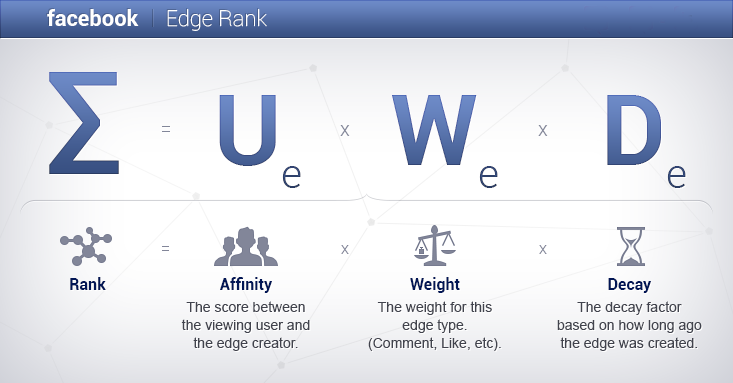
What is Facebook Edge Rank?
According to Facebook, any kind of activity or task performed by you on Facebook is termed as “Edge“. For example- a status update, comment, Like, Video sharing, Picture sharing etc. As i mentioned earlier, Facebook Edge Rank is just an algorithm which works for showing best posts in Facebook Newsfeed. The Edge Rank is calculated on the basis of different factors which will be explained later in this article.
According to an Infographic,
Facebook Edgerank is the Algorithm used by Facebook to determine where and what posts appear on each individual user’s Newsfeed.
How Facebook Edge Rank is Calculated? 
Few months ago, few blogs published that Facebook Edge Rank is Dead but it is still in use. Facebook uses the below given factors for calculating the Facebook Edge Rank:
  1. Affinity
  2. Weight
  3. Decay
edgerank 1  What is Facebook Edge Rank and Why it is Important?

1. Affinity

Affinity is the measurement of relationship between the creator of story and the viewing user. Closer the relationship, higher will be the Affinity Score. It means, more you “like” or “comment” on the story or other contents of any user, more will be chances of their appearance on your Newsfeed.
Please Note that Affinity is one-way interaction. It means, if you will show more interaction with the stories posted by other user, that content will appear on your News Feed but your stories will not appear on theirs.

2. Weight

Different types of contents has different weights. Higher the weight, higher will be the score. Facebook gives priority to different contents on the basis of below given manner:
  1. Photos/Videos
  2. Links
  3. Plain Text Updates
Facebook gives more weight to Comments than Likes which is understandable as well. However, it doesn’t mean that simply sharing of Photos/Videos will improve your score. Engagement of other users also matters. For example- A plain text update having multiple Likes and Comments carry more weight than a Photo Post having no engagement at all.

When Facebook release any new Features or Functionality, try to use it and share it with other as well because it gives more weight to them to increase their usage.

3. Time- Decay

As the name suggests, Time-Decay shows “How Old posts loses it Value or Decays”. Actually, it also depends upon the interaction of users. For example- if you are interested in any story which is 3 months old, it still has some chances to appear in your Facebook News Feed. It means, your content will maintain its freshness.

Why does Facebook Edge Rank matters for You?
Most of the Facebook users ignores the importance of Facebook Edge Rank but it is equally important for getting best results due to the below given reasons:
  1. More than 96% of the Fans never return to a Brand’s Facebook Page after the Initial Engagement. If you will work on improvement of your Facebook Edge Rank, your chances of reaching to your Fans will increase up t0 150 times.
  2. A survey shows that, about 27% of all time spent on Facebook is spent looking at the NewsFeed. It means, Facebook users spend more than 10.5 billion minutes total per day Looking at NewsFeed. Due to this reason, Improvement in Facebook Edge Rank will definitely help you.
  3. In United States, People spend more time on Facebook Newsfeed than six major news Sites.
  4. If you are an advertiser and looking to advertise your product on facebook, you can calculate your Facebook Edge Rank. If it is not good, try to improve it. It will help you to reach to more users.
How to Improve your Facebook Edge Rank?
This question is most important for all facebook users. The answer for the same is given below:
  1. Keep Your Posts Short :A survey shows that, Posts between 100 and 250 characters on Facebook gets more than 60% Likes, comments and shares. Longer posts are neglected by the users so keep it short and interesting.
  2. Be Visual : It is the human nature that people like visual contents. Sharing of Photo Albums, Photos and Videos gets 180%, 120% and 100% more engagement respectively. For this reason, try to post visual elements. You can also post a link as a photo with your Article’s Title and Url in caption. It will increase the reach.
  3. Ask Questions : I have personally experienced that people show more engagement in Questions like- Fill in the blanks or multiple choice questions. Just ask simple opinion-driven questions and get more than 90% engagment.
  4. Post on Daily Basis: 96% of your Facebook Fans never come back. To avoid this, try to post on daily basis. People always show more interest in latest topics.
  5. Be Relevant : Quality and Relevancy matters most for the users. If your want to advertise your brand, don’t post about it directly. Just write related topics otherwise users will lose interest.
  6. Be Timely: Before your start posting contents, set a time which suits you best. Once done, try to stick with it. For example- if you have decided to publish a post at 4 PM, do it on daily basis. Users will wait for your next post at 4PM.
What About the Purchased Facebook Likes?
Like Adsense Accounts, People also purchase Facebook Likes. I recommend you not to purchase Facebook Likes because it affects your site. It happens because, those fans never visit your blog or share, comment on your Facebook Post. It is another form of in-activity which is dangerous for Facebook EdgeRank. Always try to get the natural likes.

How to Know my Facebook Edge Rank Score?
Till now, Facebook hasn’t released any Edge Rank checker tool officially but so many un-official tools are already available on internet. You can also check your Facebook Edge Rank by clicking on below given button after signing into your Facebook account and selecting your Facebook Fan Page.
After measuring your Facebook Edge Rank, the website will send its report to your Primary EMail account(One which is set by you in your Facebook Account).

Tuesday, October 8, 2013

                           On-Page and Off-Page SEO Tips


about SEO tips both on page and off page


Last time in the SEO category, We discussed that how can we reduce the loading time of our blog that is really important for every webmaster to make their webpages load faster. And now we're going to share some On-Page and Off-Page SEO Tips that can help every blogger and webmaster to get high ranking in search results. Search Engine Optimization is important for every blogger or webmaster to drive real and huge traffic. But the person needs to understand the SEO before doing it. There are thousands of video tutorials, articles, tutorials and a lot of media on the web where we can easily learn SEO. We've also shared some SEO tips here previously which were really important. Just navigate to the SEO page from the top menu to get it. So, now today I'm going to share some search engine optimization tips for getting high search ranking.
On-Page SEO Tips

1. Proper Keyword Research


The first thing is that you should do the proper keyword research with the use of many tools like Google Keywords Tool. With these tools, you've to enter any keyword and after a little loading they will tell you that how much time that keyword is searched monthly and also from those countries. So, By the use of these tools, you've to search some keywords related to the topic of your content and if any keyword is getting a lot of searches monthly then I recommend to use that keyword in your post title, permalink, search description or make it your main keyword of the topic. Once, If you got the best position with that keyword then you will easily get huge organic traffic.

2. Post Title Shoudn't Cross 55 Characters


The other thing for the post title is that it shouldn't cross 55 characters. A character is the each letter along with spaces in any document. So, you've to write a post title that should have less than 55 characters or fixed 55 characters. You can use some online tools to count the characters otherwise counting it manually will waste your time. The reason for it is that Google shows the first 55 characters of any webpage in the search results page, if the post title crosses it's limit then it will be shown broken. So try to write small post titles with the main keywords only.

3. Optimize Images With ALT and Title Attributes


The third thing is that you've to optimize your images with the ALT and Title Attributes. These attributes will tell the search engine's crawlers that about what they are created or in other words, these attributes will describe the image to the search engine's robots and crawlers. Always try to add the main keywords and less than 5 word keyword in the image attributes for better SEO. These will help you to drive even more organic traffic from Image Search Engines. If you're a senior reader here then you may know that previously we'd discussed about the use of attributes in images. If not then I recommend you to go and read the article. Click here to learn about optimizing images with ALT and Title Attributes.

4. Optimize Permalink


Optimizing the permalink is another great idea for boosting the organic traffic. If you use Blogger as your blogging platform then you might know that Blogger automatically writes the short permalink of your post title but sometimes it looks chopped. If you look into deep then you will find out that it writes the first 5/6 words of the post title. If we manually write our custom permalink with the main keywords and in a good manner like compressing post title then it will be better for SEO. So, I recommend to write a short permalink for your each and every post with less than 6/7 words. And another thing which you should remember while customizing permalink that it must contain the main keywords.

5. Meta Description


The Meta Description is the thing that attracts the searcher to enter in your web page and become a visitor of you. It is a kind of description which describes a page or post to the search engine's crawler and the visitor from search results. Actually, the search engine's robots read it and it also shows in the search results page. It will be shown below the post title and permalink of your result. So, I recommend to write the perfect description which will attract the visitors and search engine robots should also love it. The limit for the search description is 150 characters. Here is the detailed post on how to add meta description tags in every post with blogger.

6. Internal Linking


Internal Linking is also an important factor which you've to do or improve on your blog or site. Internal Linking means connecting each and every web page with each other and there shouldn't be any web page which should not be linked to any web page on your blog or site. Actually, Internal linking helps the search engine's robots and crawlers to index your web page easily and quickly. This will also improve the bounce rate in Google Analytics and the readers will also enjoy it by getting a lot of content. Few days, I had created a fantastic post on how can we improve the internal linking of a blog.

7. Use 2-4% Keyword Density


Have you ever heard about the Keyword Density in the Search Engine Optimization? If yes then you may know about this era, but if not then let me explain it. Using the main keyword of the topic again and again in the content is known as keyword density. It is especially for those who write articles or text content for their blogs or websites. Most of newbies use the main words again and again to increase the total words of the content but they are unaware of the Keyword Density. I recommend to use the Main Keyword in the content up to 2-4% otherwise if the density is more than 2-4% then your post may be getting penalized by Google Penguin.

8. Avoid Keyword Stuffing


Keyword Stuffing is same like as Keyword Density but the place of these both are changed. Keyword Density is used in the content while Keyword Stuffing is used in the Post Title, Permalink and Search Description. Using the Main Keyword of the topic repeatedly in the Post Title, Permalink and in the Search Description is called Keyword Stuffing. We should use the main keyword only one time in these three places otherwise we should be ready for being penalized by Google Penguin.
Off-page SEO Tips

1. Socialize Post After Publishing


So, when you're done with the on-page SEO and published your post then you've to first socialize your post like sharing it on many social sites like Facebook, Google+, Twitter, Pinterest and many more. You should share it in the official social accounts of your blog like Facebook Fan Page, Twitter, Google+ Page and its most important. After that share it to your personal social accounts to get your readers and fans know that you've published your latest post. It will help to get traffic from social networking sites and also helps the search engine robots to index your site faster.

2. Social Bookmarking


After the sharing your post on social networking sites you've to bookmark or send your post to social bookmarking sites. Social Bookmarking is the great way to get traffic in very less time and it will help you in getting good backlinks to your site or blog. Pinterest, StumbleUpon, Delicious, Digg, Inbound.org, Bizsugar and Good.is are popular sites which I also use. You can even search more social bookmarking to submit your new posts on huge social bookmarking directories.

3. Create Backlinks For The Post After Publishing


This is the third one of the most important thing that you've to create backlinks for the post which you've published. You can also make backlinks for any post to get it on high ranking. This is one of my own experienced method which I usually do to rank my posts. Simply, After publishing the post I socialize it, submitting to social bookmarking sites and then I try to create backlinks as more as I can. We can comment of Commentluv enabled blogs to get the backlink to our post. You will be thinking that these are nofollow backlinks but believe me they will give some benefit instead of making zero backlinks. For the higher ranking and in a quick way, I recommend to make the dofollow backlinks for your post which will increase the SERP very fast. Guest posting is an ideal thing for it to get dofollow backlinks.
Your Turn

My lovely friends and readers, these were some cool SEO tips which I wanted to share today. By the use of these On-Page and Off-Page SEO Tips everyone can get high search ranking easily but it also depends on the content quality. Always try to create the unique and quality content which should be loved by the readers and also by the search engines. I hope you've enjoyed reading this article and please share it with your friends. Take a lot of care till the next post. 

How Google Ranks a website: 200 Factors Explained

How Google Ranks a website

Every Blogger or Webmaster want to see his/her website on Top specially in Google SERPs(Search Engine Result Pages). For achieving this, they hire SEO Experts and thus invests a huge amount of money. SEO experts always face some kind of difficulties while optimizing any website or blogs for Google because Google never provide any kind of information related to its indexing protocols. Few months ago, the latest Hummingbird Update affected the traffic of all kinds of websites and blogs. Whenever Google introduce their new Algorithms, SEO experts are left with their heads spinning. I always try to post all kinds of information related to SEO for helping new bloggers and webmasters. It is really tough to know, How Google Ranks a website. As far as i know, Targeted keywordsBacklinks and SMO plays an important role along with some other factors which are discussed below.
While reading an infographic on entrepreneur.com, i came to know about some more Factors which are important for getting better ranks. I am sharing the same here.
ranking factors infographic 2 How Google Ranks a website: 200 Factors Explained

Blogger Sitemap Generator Tool: How to use it for better SEO?

Last year Blogger added automatic sitemap generation functionality to their blogger or blogspot platform. It means, your blogspot automatically generates an XML sitemap file which automatically changes its contents, when you update your blog. You can access the sitemap Page of any blogspot blog by visiting http://www.blogname.blogspot.com/sitemap.xml . If you don’t know anything about XML sitemap file, it would be interesting for you to know that an XML Sitemap file is necessary for all kind of blogs and websites. It helps the crawlers of search engines to crawl and index your blog and website. However, automatic sitemap generation doesn’t guarantee that, search engine crawlers will crawl and index all of your articles. So many times, it doesn’t index important articles which hurts. I will provide the solution of this problem via this post.
Untitled 1 Blogger Sitemap Generator Tool: How to use it for better SEO?

Why can’t i use Automatic Sitemap Generation Functionality in Blogger?
As i mentioned earlier, Blogger has an Automatic Sitemap Generation Functionality which automatically creates an XML Sitemap file at http://www.yourblog.blogspot.com/sitemap.xml. You can submit this Sitemap file to Google Webmaster Tools or any other place without any issue. However, When you switch to Custom Domain in blogger blog i.e something like http://www.yourblog.com, http://www.yourblog.in etc, the automatic XML sitemap generation stops working. It means, it only works domains like http://www.yourblog.blogspot.com. At this time, you need to manually configure XML sitemap for your blog.


How to use Blogger Sitemap Generator for better SEO?
You can do this by following below given method.

Method 1: Using the Blogger XML Sitemap Generator by Digital Inspiration

  • Visit http://ctrlq.org/blogger/
  • Type the url of your Blogger blog in the filed provided. You can use either blogspot.com address or your custom domain. The screenshot is shown below:
110 Blogger Sitemap Generator Tool: How to use it for better SEO?
  • Once done, click on “Generate Sitemap” button. You will see below given screen:
212 Blogger Sitemap Generator Tool: How to use it for better SEO?
  • Now, sign into your Blogger Profile and navigate to Settings>>Search Preference. The screenshot is shown below:
37 Blogger Sitemap Generator Tool: How to use it for better SEO?
  • Just click on “Edit” link which is placed just beside the [Disabled] option in “Custom robot.txt” option. The screenshot is shown below:
38 Blogger Sitemap Generator Tool: How to use it for better SEO?
  • Enable the Custom Robot.txt content by choosing the “Yes” option. The screenshot is given below:
45 Blogger Sitemap Generator Tool: How to use it for better SEO?
  • Now, Paste the Generated XML code(Which was generated in 3rd step) in this box. The screenshot is shown below:
63 Blogger Sitemap Generator Tool: How to use it for better SEO?
  • Once done, click on “Save Changes” button and you are done. After doing this, there is no need to submit the Sitemap file to Google Webmaster Tools. Google Crawler will use atom.xml and will automatically index all of your contents.

Method 2: Using the Blogger XML Sitemap Generator by MBT

74 Blogger Sitemap Generator Tool: How to use it for better SEO?
  • In the first textbox, type the name of your url including” http://” at the begining and “/” at the end of url. For example – http://www.bankerzindia.com/ or http://www.yourblog.blogspot.com/.
  • In the second text box, type the number of Post present in your blogspot blog. Check the below given screen for understanding this matter clearly.
82 Blogger Sitemap Generator Tool: How to use it for better SEO?
  • Once done, click on “Submit” button. It will generate an atom.xml for you. The screenshot is shown below:
92 Blogger Sitemap Generator Tool: How to use it for better SEO?
  • You will have to submit the generator Sitemap to Google Webmaster Tools. To do this, open the homepage of Google Webmaster Tool and click on your website. In Dashboard, click on “Sitemaps”. The screenshot of the same is shown below:
7 Blogger Sitemap Generator Tool: How to use it for better SEO?
  • A new window will Open. Click on “Add/Test sitemap” button. The screenshot is given below:
8 Blogger Sitemap Generator Tool: How to use it for better SEO?
  • Now, add the generated atom.xml(Generated in above step 4) in the space provided. The screenshot is shown below:
102 Blogger Sitemap Generator Tool: How to use it for better SEO?
  • For understanding the above mentioned step much better, see the below given figure:
113 Blogger Sitemap Generator Tool: How to use it for better SEO?
  • Once done, click on “Submit Sitemap” button. After clicking this button, you will see the below given screen:
122 Blogger Sitemap Generator Tool: How to use it for better SEO?
  • Just click on “Refresh the Pagelink . You would be able to see the result. The screenshot is given below:
131 Blogger Sitemap Generator Tool: How to use it for better SEO?
  • That’s it. You are done. Enjoy
7 How to index a new website or blog within 5 minutes in Google?
  • A new window will Open. Click on “Add/Test sitemap” button. The screenshot is given below:
8 How to index a new website or blog within 5 minutes in Google?
  • In next step, You will have to provide the url of your Sitemap Page which usually consists of XML codes. WordPress users can easily use different sitemap Plugins for the creation of Sitemap. If you are a blogger user, Generate your Sitemap Page and note the url.
  • Now Provide the address of your sitemap page in the space. Once done, click on “Submit Sitemap” button .The screenshot is given below:
9 How to index a new website or blog within 5 minutes in Google?
  • That’s it. You have submitted the sitemap of your website as well. Now, move to next step.

Step 4:: Fetch your Website as Google

  • Again open the Home Page of Google Webmaster Tools and click on the desired site to see the dashboard.
  • In dashboard, click on Crawl>>Fetch as Google.. The screenshot is given below:
42 How to index a new website or blog within 5 minutes in Google?

  • In the screen which opens, Simply click on “Fetch” and wait for sometime. The screenshot is given below:
111 How to index a new website or blog within 5 minutes in Google?
  • Now submit url to index. Choose whether, you want to index only the URL or URL and all linked pages according to your choice.
10 How to index a new website or blog within 5 minutes in Google?
  • That’s it. Google will index your new website or blog within 5 minutes. However, don’t use this method again and again even after submitting your site once.
From the Editor’s Desk
I love sharing helpful tips. This was my another effort to help new bloggers who waste their time in indexing their website or blog. I am not saying that, link building is a bad idea as it improves your position in SERPs(Search Engine Result Pages) but the above mentioned method is the quickest way to index your blog or website.
However, don’t forget to submit your website and blog in other search engines for better results. If you have any problem, feel free to discuss the same via comments. Your comments are so precious for me.
Blogger and WordPress are the two blogging platform which are very much popular these days. As you all know, WordPress is considered powerful due to the availability of Various Plugins. Blogger doesn’t support plugins but the developers are continously adding new features to it. This week, i am providing you a Search Engine Optimization Tutorials for optimizing your blogger blog. This is the third post of our “Blogger Advanced SEO Pack for Beginners and Advanced Users” series. Today, i will show you, How you can use the Custom Robot Header Tags for optimizing a blogger blog. It is an advanced tool so new bloggers always avoid its use. It can really boost your ranking and definitely traffic so i am providing you the complete setup tutorial.

         Understanding the Different Tags used in Custom Robot Header Tags
Before you start using Custom Robot Header Tags in blogger, you must have proper knowledge of Different tags which are used. Without proper knowledge of different tags of Custom Robot Header Tags, you won’t be able to use it properly. In this case, it can do much harm as well so lets know the meaning of all tags.
116 How to use Custom Robot Header Tags for better SEO in blogger?


How to Setup Custom Robot Header Tags for better SEO in Blogger?
Just follow the below given steps and enjoy:
  • First of all, Sign into your Blogger Account.
  • In Blogger’s Dashboard, Click on “Settings”. Below given figure shows the same:
 How to use Custom Robot Header Tags for better SEO in blogger?
  • In Settings, Click on “Search Preferences” option. After doing that, you will see a new screen on the right side. Just click on “Edit” link which appears beside “Disabled” option of ”Custom Robot Header Tags” option. Below given figure shows everything clearly.
214 How to use Custom Robot Header Tags for better SEO in blogger?
  • Just enable this option by choosing the “Yes” radio button. After choosing “yes” option, You will see the below given screen:
311 How to use Custom Robot Header Tags for better SEO in blogger?
  • If you have already read the above provided information, which tells the meaning of all tags, you can easily apply the best settings for your blog. If you are confused, just apply the below given settings. The below given settings are recommended by me.
55 How to use Custom Robot Header Tags for better SEO in blogger?

  • That’s it from the settings part. Just click on “Save Changes” button and you are done.

From the Editor’s Desk
As i mentioned earlier, Naive or new blogger users hardly make use of Custom Robot Header Tags. Most of the time, this functionality is used by Experts because it comes under Advanced SEO functionality, which has been provided by blogger.
I always try my best to make every tutorial easy for you. If you are still facing any difficulty or have any query, feel free to ask the same. It would be my pleasure to assist you.

How to use Blogger Blog Post Titles for Search Engine Optimization?


SEO which is an abbreviation for Search Engine Optimization which plays an important part in the success or failure of any website or Blog. A good Search Engine Optimization technique can bring a lots of traffic to a website whereas a poor or bad Search Engine Optimization practice can cause havoc as well. That’s probably the reason why, most of the website owners hire Search Engine Optimization Specialist. Every website or blog owner want to see his website/blog on top.  Search Engines are the best way to bring traffic to your blog or website. A recent survey shows that “74% users loves to check the search results up to 2 pages in Google. They don’t go even for the 3rd page, which appears in the search results” . It means, if the content of your blog or website appears on page 5 or 6 on search engine result pages, you won’t get visitors. That means, you will have to optimize your website or blog for search engines. Search Engine Optimization experts optimize your website and its contents and bring it either to page 1 or 2. Search Engine Optimization is a broad field so i will not discuss everything in this post.
Basically, there are two types of Search Engine Optimization: On-Page SEO and Off-Page SEO. Today, i will show you the way to use Blogger Blog Post Titles for Search Engine Optimization which comes under On-Page SEO.  So many new bloggers are there, who think that Blogger is bad in terms of SEO than WordPress which is completely wrong. Blogger is a product of Google which is the best search engine in the world.  Lets come to the point now.
How does Blog Post titles helps in Search Engine Optimization?
If you are new in the field of blogging, it would be interesting for you to know about the usages of different Header tags. Normally we use “H1″ tag for blog titles, “H2″ and “H3″ tags for blog post titles. By Default, Blogger assign “H3″ tags to Blog post titles. If you want to prioritize your blog post titles for search engines, simply change it to “H2″ tag.
By default, Blogger only shows Blog Titles in search engine results along with description. It Generates the description on the basis of your contents.  However, it is not considered as a better technique because most of your blog post doesn’t appear in search engine result pages(SERPs). With this approach, you won’t be able to attract traffic to your blog. To get best result, your Blog post titles must appear in search engine result pages. You can also Optimize the Search Description for improving traffic.
Just see the below given figure:


How to show Blogger Blog Post Titles in SERPs rather than Blog Name?
Simply follow the below given steps:
  • Sign into your Blogger Account.
  • Click on “Template” option which appears on the left side. The screenshot is shown below:
template How to use Blogger Blog Post Titles for Search Engine Optimization?
  • After that, Click on “Edit HTML” option. The below given figure shows the same:
edit html How to use Blogger Blog Post Titles for Search Engine Optimization?
  • Press “Ctrl + F” on your keyboard and search for the below given code in your template html Editor.
                      <title><data:blog.pageTitle/></title>
  • If you are not able to understand, what i am trying to say, Have a look on below given figure:

  • Now, replace “<title><data:blog.pageTitle/></title>” with below given code according to your need.

1. Only Show Blog Post Titles in search Results

If you want to show only Blog Post titles in search engine result pages, replace “<title><data:blog.pageTitle/></title>” with below given code:


<b:if cond='data:blog.pageType == &quot;index&quot;'>
<title><data:blog.title/></title>
<b:else/>
<title><data:blog.pageName/></title>
</b:if>

Once done, save the template and enjoy.
If your blog’s Name is “SEO Blog” and your blog post’s title is ” How to Improve your search engine rankings?“, search engine will show the same in its search result pages along with search description.

2. Show Blog Post Title along with Blog’s Name

If you want to show your Blog Post Titles followed by the name of your blog, replace “<title><data:blog.pageTitle/></title>” with below given code:


<b:if cond='data:blog.pageType == &quot;index&quot;'>
<title><data:blog.pageTitle/></title>
<b:else/>
<title><data:blog.pageName/> ~ <data:blog.title/></title>
</b:if>

In the above code, you can replace the “~” sign with any kind of sign of your choice.
If your blog’s name is “SEO Blog” and your blog post’s title is “ How to Improve your search engine rankings?“, search engine will show blog post title with the name of your blog and description. For example:
How to Improve your search engine rankings?~SEO Blog
Once done, save your template and get ready to see more traffic on your blog.

Note- If you are using a Custom Blogger Template, there is no need to apply the above mentioned code because most of the designers already implements it before publishing it for the downloads.

Top 10 must know seo tips for new bloggers

                                Search Engine Optimization 

is an important part which decides the future of any blog or website. Many bloggers and content writters complains that they failed to get a better exposure even after writing unique contents.The reason can be probably the bad SEO. Blog posts act as a fuel for blogs whereas SEO acts as engine so without seo, your blog posts will go into vein.Today, I am providing some must know SEO tips for new bloggers. New bloggers should know these tactics so as to get better results/exposure to search engines.

1. Use Informative and Eye catching Post Titles and Meta Description

Post Titles are the most important part of SEO. Web surfer looks for your Post Title first so try to make it
Informative and Eye catching.It should not be too long because Google only shows a Post title of length upto 66 characters only. You should try to choose a title according to your contents. Never try to make it eye catching just for viewers. It should be unique so that search engines can show your blog post on their first page when someone tries to find something related to your blog post or titles. Meta Description are also an
important part because it appears below your post titles when someone share your blog post in their social
network. So try to make it short and informative so as to make it interesting for readers. It doesn’t affect search engine results but still plays a major role in Popularizing your blog.

2.  Contents are the real King


If you want to remain on Top in search results then you will have to spent some time on your contents because contents are the real king.Sometimes even a copy-pasting(a blog which steals content from other blogs) blog get good temporary exposure in search results but after an update like Panda or Penguin, they vanishes from the search result so it is always important to write quality contents.Have a close look on your contents and check for the following parts:

  • Is your Content Original and Unique?

  • Do you use Images and Videos for better explanation of your Points?

  • Is your Post descriptive and Informative for viewers?

  • Is your post worth sharing?

  • Are you Good in English when writing your posts?


  • Whether your Post attracts new readers or users?


If your answer is “Yes” then there is no need to worry. You will definitely get better results.

3 . Use Heading Tags Appropriately

Heading Tags are represented by H1,H2,H3… etc, out of which H1 is considered best for search engines but multiple use of H1 is not recommended. If you will use H1 tag more than once, Google will consider it as an effort of Over Seo and will penalize you. So You should only use H1 tag once in your blog post. To give further heading and Subheading, use H2 or H3 tags.


4. Submit a Sitemap of your Blog to all Major Search Engines

A sitemap file contains all links related to your blog so it is most important for SEO as well. If you want the search engines to index your blog then simply create a sitemap of your blog and submit it to all major search engines. Lots of sitemap generator tools are present on internet so simply use any of them for the same. I will suggest you to add a Sitemap page to your blog.

5. Optimize Images to get Better results

Images are an important part of blogs. It not only makes your post attractive but can help you to get more visitor as well.


6. Make your Blog Load Faster

To get success in blogging, your blog must load faster because readers will stop taking interest in your blog, if its load time is high. It also has negative impact on search engine. Actually they use their bot to index your pages but now internet has many blogs so it will not waste its time for your slow loading blog. I have already provided 10 Killer tips to reduce your blog load time

7.  Update your Blog Regularly

Every one loves fresh contents. Search engine will definitely neglect your blog, if stopped showing any activeness in your blog. Websites which are providing some kind of services can update after long period but a blogger should update his/her blog contents on daily basis. If you can’t manage to add many then add just one daily. It will tell the search engine that you are still active. Additionally it also improves your alexa rank.

8. Make better use of Keywords

All kinds of searches are based upon some keywords. Normally Users also enters keywords in Google search instead of whole sentence.So wise use of keywords can help you to get better exposure in search results. Before writing your contents search for most popular keywords. To do this use Google Adword keyword tool. Try to maximize the use of keywords in your post contents but don’t over use them because it comes under over seo which can give you poor result as well.So use it wisely.

9 . Never Purchase Backlinks


Purchasing of Backlinks are not recommended because they provide automated backlinks and use the same anchor text all the time and search engine never likes auto-bots so it can be harmful for your blog.
Use anchor text properly. Instead of using text like “Click here to download” or something like that, use some other text which looks impressive.

10.  Try to bind the new visitors


It is always important to bind new visitors. Some possible reasons why new visitors leave your blog in their first visit are as follows:

  • Difficult Navigation.\

  • Slow loading\

  • Poor Look\

  • Use of excessive Pop-up Ads\

  • Useless contents\

  • Broken Links\

You can add links to your older post to bind a new visitor to your blog.
Have a look on your blog and check whether your blog is also experiencing these kind of issues? If yes then try to sort out these things and enjoy..